Hermes Agent One Click Deployment
Self-host the self-improving AI agent on your own VPS. Hermes Agent creates skills from experience, remembers across sessions, and connects to 21+ messaging platforms with 20+ LLM providers. Your API keys, your conversation history, your infrastructure.
What Is Hermes Agent?
Hermes Agent is the self-improving AI agent built by Nous Research — the lab behind Hermes, Nomos, and Psyche models. It’s not a coding copilot tethered to an IDE. It’s not a chatbot wrapper around a single API. It’s an autonomous agent that gets more capable the longer it runs.
It lives wherever you put it — a $5 VPS, a GPU cluster, or serverless infrastructure that costs nearly nothing when idle. Talk to it from Telegram while it works on a cloud VM you never SSH into yourself. Open-source under the MIT License, with 208K+ GitHub stars.
One Agent, Every Platform
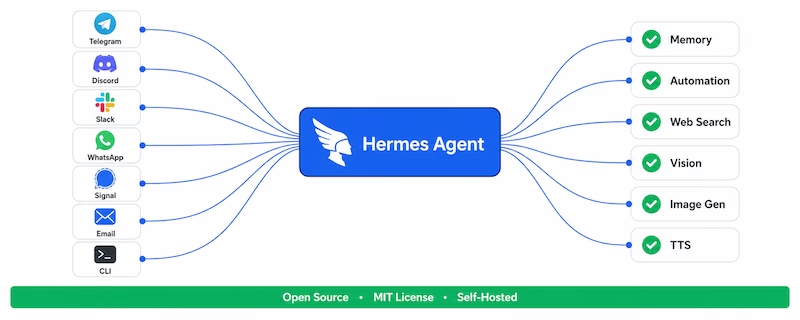
The same agent runs on 21+ messaging platforms from a single gateway — with full tool access on every channel, not just chat. Telegram, Discord, Slack, WhatsApp, Signal, Matrix, Mattermost, Email, SMS, iMessage, Home Assistant, Microsoft Teams, Google Chat, and Chinese platforms including DingTalk, Feishu, WeCom, and Weixin.
Built to Remember and Automate
Hermes is the only agent with a built-in learning loop. It creates skills (reusable SKILL.md documents) from experience, improves them during use, and persists knowledge across sessions. Two curated memory files — MEMORY.md for environment facts and lessons learned, USER.md for your preferences and communication style — are injected into every conversation.
Beyond memory, the agent runs scheduled cron jobs, spawns isolated subagents for parallel workstreams, and executes Python code with full tool access. It browses the web, automates browsers, analyzes images, generates images, and speaks with natural voice — all from one process that stays online 24/7 on your VPS.
curl -fsSL https://hermes-agent.nousresearch.com/install.sh | bash
Hermes Agent vs Hermes WebUI vs Workspace
Hermes offers three products for self-hosting. All run on the same VPS — the difference is how you interact with the AI. Here’s what each one does and which providers support it.
Hermes Agent
The self-improving AI agent by Nous Research. Runs headless 24/7 on your VPS, creates skills from experience, remembers across sessions via MEMORY.md and USER.md, schedules cron jobs, delegates to subagents, and connects to 21+ messaging platforms with 20+ LLM providers.
- Persistent memory (MEMORY.md + USER.md)
- 20+ LLM providers, 200+ models
- 21+ messaging platforms from one gateway
- Self-improving skills (agentskills.io)
- Cron scheduling + subagent delegation
Hermes WebUI
A full-stack deployment that pairs the Hermes Agent with a fast self-hosted web chat UI. You get the full agent — memory, skills, tools, messaging — plus a browser-based interface to manage config, API keys, sessions, and skills from a web dashboard with an in-browser terminal.
- Bundles Agent + web chat UI in one deploy
- Browser-based admin panel for config
- Manage API keys, sessions, and skills via web
- In-browser terminal alongside chat
- Access from mobile and desktop browsers
Hermes Workspace
The most advanced Hermes surface. An open-source command center for your Hermes AI agent — chat, memory, skills, terminal, and files in one interface. Switch between Claude, GPT, Gemini, and local models mid-conversation without losing context or memory.
- Multi-model chat with mid-conversation switching
- Skills, memory, and terminal in one UI
- File management built into the interface
- Full agent capabilities in a command center
- No per-message fees, no data leaves your server
One-Click Install Availability by Provider
| Provider | Hermes Agent | Hermes WebUI | Hermes Workspace |
|---|---|---|---|
| Hostinger | ✓ | ✓ | ✓ |
| Railway | ✓ | ✓ | ✓ |
| Contabo | ✓ | — | — |
| xCLOUD | ✓ | — | — |
| CubePath | ✓ | — | — |
What Makes Hermes Agent Different
Six specific capabilities that set Hermes Agent apart from every other AI agent framework. All verified from the official documentation.
Self-Improving Skills System
The only agent with a built-in learning loop. Creates reusable SKILL.md documents from experience, improves them during use, and shares them via the agentskills.io open standard. ~90 bundled skills, ~60 more installable from the Skills Hub.
20+ LLM Providers
Swap models mid-workflow without changing anything else. Nous Portal, OpenRouter, Anthropic, OpenAI, Google Gemini, DeepSeek, xAI Grok, and local models via Ollama. Credential pools rotate API keys automatically. Fallback providers on failure.
21+ Messaging Platforms
One agent, every channel — from a single gateway. Telegram, Discord, Slack, WhatsApp, Signal, Matrix, Email, SMS, iMessage, Microsoft Teams, Google Chat, DingTalk, Feishu, WeCom, and more. Full tool access on every platform, not just chat.
6 Terminal Backends
Runs wherever you need it: local, Docker, SSH, Daytona, Modal, or Singularity. Daytona and Modal offer serverless persistence — your environment hibernates when idle, costing nearly nothing. Talk to it from Telegram while it works on a cloud VM.
Cron + Subagent Delegation
Built-in cron scheduler with natural language: “every weekday at 9am, summarize my inbox and post to Slack.” Delegate tasks to isolated subagent instances with restricted toolsets. Execute Python code with full RPC tool access in a single turn.
7-Layer Security Model
Defense-in-depth: user authorization, dangerous command approval, container isolation, MCP credential filtering, context file prompt-injection scanning, cross-session isolation, and input sanitization. Secret redaction on by default.
What People Build with Hermes Agent
Real projects from the Hermes Agent community — 262 user stories across X, GitHub, Reddit, Discord, and blogs. Here’s what happens when an AI agent runs 24/7 on your VPS and never resets.
Always-On Personal Assistant
Every weekday at 9am, summarize your inbox and post to Slack. Daily briefings, calendar prep, follow-up reminders — all running as cron jobs on your VPS while you sleep.
— Community story, SubstackCoding & DevOps Teammate
PR review, CI/CD automation, bug investigation, live deploys. One developer used Codex alongside Hermes to monitor agent-to-agent workflows live, catching breaks and fixing them in real time.
— @gkisokay, XAutomated Trading Bots
A self-learning weather trading bot turned $100 into $216 in 48 hours. Hermes scanned weather markets every 60 minutes, compared three forecast sources per location, and wrote its own strategy notes after each trade.
— @DeRonin_, XContent & SEO Automation
Research, write, optimize, and publish — autonomously. One user built a complete Turkish locale skill pack with real-time market data in TRY, Turkish news sources, and daily PNG briefing cards delivered via Telegram.
— @erhnysr, DiscordResearch & Knowledge Work
Pull notes, browse sources, summarize long inputs. Yesterday’s research informs today’s session — memory compounds across sessions, so the agent gets smarter about your domain with every interaction.
— Community stories, GitHubSelf-Hosted Google Drive
One user set up Hermes with Nextcloud and LibreOffice to replace Google Drive with Google Docs — fully self-hosted. The agent manages files, edits documents, and handles the same workflow without any cloud intermediary.
— @salma.1492, Discord“Told it to Google me and ship a landing page to my VPS — it ran the searches, found kinks, created the page, SSH’d into my VPS, uploaded the page, then texted me when it was done. What?!”
— @emmagine79, X
Hermes Agent vs OpenClaw
Both are open-source AI agents built by Nous Research. Both run on your VPS with multi-platform messaging. But they’re built for different primary use cases. Here’s what sets them apart.
| Feature | Hermes Agent | OpenClaw |
|---|---|---|
| Core focus | Self-improving learning loop | Multi-channel messaging + companion apps |
| GitHub stars | 208K+ | 381K+ |
| License | MIT | MIT |
| Self-improving skills | ✓ Creates SKILL.md from experience | — |
| Persistent memory | ✓ MEMORY.md + USER.md | ✓ Session-based |
| Messaging platforms | ✓ 21+ including Chinese platforms | ✓ 24+ including iMessage |
| LLM providers | ✓ 20+ providers | ✓ 25+ providers |
| Cron scheduling | ✓ Built-in, natural language | ✓ Cron + hooks + standing orders |
| Subagent delegation | ✓ delegate_task + Kanban board | ✓ Task Flow automation |
| Terminal backends | ✓ 6 (local, Docker, SSH, Daytona, Modal, Singularity) | ✓ Docker-native |
| Serverless hibernation | ✓ Daytona + Modal | — |
| Plugin marketplace | ✓ Skills Hub (agentskills.io) | ✓ ClawHub |
| MCP support | ✓ Client + server | ✓ Client + server |
| Best for | Developers, automators, teams wanting an agent that learns | Personal assistant users wanting cross-device chat + mobile apps |
Choose Hermes Agent if you want an agent that gets smarter over time — it creates skills from experience, runs complex automated workflows on a schedule, and can run on serverless infrastructure that costs nearly nothing when idle. Choose OpenClaw if you want a personal assistant with native mobile apps (iOS, Android, macOS) and broader messaging reach. Both are available as one-click installs on Hostinger, Contabo, and xCLOUD.
Why Self-Host Hermes Agent?
Self-hosting keeps your API keys, conversation history, and business context on your own infrastructure. Dedicated resources for web browsing, code execution, and multi-agent workflows that run without external throttling. Your agent, your server, your rules.
Total Privacy
Every message, memory entry, and tool execution stays on your VPS. No cloud intermediary can read your Telegram conversations, inspect your file operations, or profile your agent’s behavior. Secret redaction is on by default — API keys are scanned and masked before they reach the model.
24/7 Always-On
Your agent stays online around the clock, running scheduled cron jobs while you sleep. Memory persists on your disk in MEMORY.md and USER.md. Sessions, skills, and the SQLite state database survive restarts — the agent picks up exactly where it left off.
Predictable Flat Cost
A single VPS from $5/mo replaces per-token API billing when you run local models via Ollama. A heavy week running the agent costs the same as a quiet one. No per-message fees, no usage-based surprises — just flat monthly hosting.
Runs Anywhere
Six terminal backends: local, Docker, SSH, Daytona, Modal, or Singularity. Deploy on a $5 VPS, a GPU cluster, or serverless infrastructure that hibernates when idle and costs nearly nothing. Talk to it from Telegram while it works on a cloud VM you never SSH into.
One Click Install on Any VPS
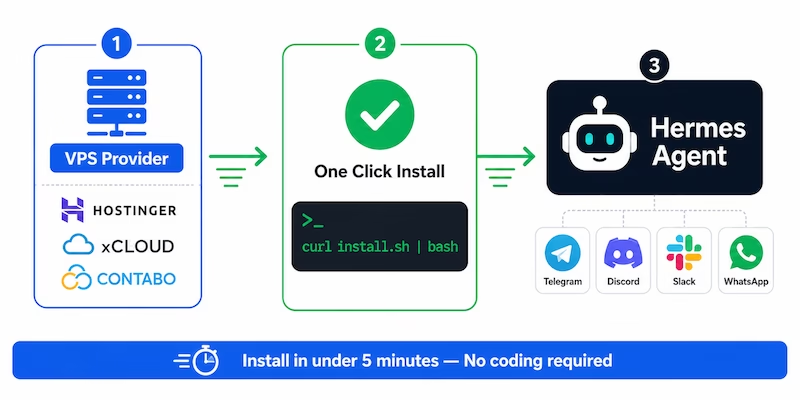
The installer handles everything automatically — Python 3.11 via uv, Node.js v22, ripgrep, ffmpeg, the repo clone, virtual environment, and the global hermes command. The only prerequisite is Git. By the end, you’re ready to chat.
curl -fsSL https://hermes-agent.nousresearch.com/install.sh | bash
Prefer Docker? The official image is nousresearch/hermes-agent — all data lives in a single mounted volume at ~/.hermes, so upgrades never lose your config.
Choose a VPS — pick from the providers below, starting at $5/mo
SSH in and run the install command — all dependencies auto-installed
Run setup — hermes setup --portal covers a model plus web search, image gen, TTS, and browser in one OAuth
Connect messaging — hermes gateway setup links Telegram, Discord, Slack, and 18+ more
VPS Providers for Hermes Agent
Five hosting providers offer one-click Hermes Agent installation. Compare pricing, specs, and what makes each provider different — from official Docker templates to fully managed hosting.
Official one-click Docker VPS with three separate Hermes templates — Agent, WebUI, and Workspace. The only provider offering all three products. Built-in Docker manager, AMD EPYC processors, and a free domain for the first year.
- 1 vCPU, 4GB RAM, 50GB NVMe (KVM 1)
- 4TB bandwidth, 1 Gbps network
- Docker manager with container log access
- 30-day money-back guarantee
The only fully managed option. xCLOUD handles OS updates, security patches, SSL, firewall, daily backups, and auto-restart on crash. Telegram gateway is pre-configured on deploy — open Telegram and start chatting on day one. No server setup required.
- 4 vCPU, 6GB RAM, 100GB NVMe SSD
- 30TB bandwidth, 30+ server regions
- Daily automatic backups, one-click restore
- 14-day money-back guarantee
Best hardware-per-dollar ratio. €5.50 gets you 8GB RAM and 4 vCPU cores — enough to run local models via Ollama alongside the agent. Flat monthly pricing means a busy week costs the same as a quiet one. 23 years in business, 275,000+ customers.
- 4 vCPU, 8GB RAM, 75GB NVMe (Cloud VPS 10)
- Unlimited traffic (fair usage), 200 Mbit/s port
- 9 regions across EU, NA, Asia, Australia
- Auto backup available as add-on
Platform-as-a-Service, not a VPS. Deploy by connecting the Hermes Agent GitHub repo — Railway handles the container, scaling, and networking automatically. Per-second billing means idle services cost nearly nothing. Best for experimentation and burst workloads.
- Usage-based per-second billing
- Git-based deployment (connect repo, auto-deploy)
- Automatic scaling and monitoring
- Community templates for all 3 Hermes products
Enterprise-grade infrastructure with AMD EPYC processors and DDoS protection. Hourly billing — power off anytime and pay nothing. Built-in AI Gateway unifies GPT, Claude, Grok, and DeepSeek with zero markup. $20 free credit for new accounts, no credit card required.
- 2GB RAM, 40GB NVMe (gp.nano, +$1.50 IPv4)
- 5 datacenters: Barcelona, Amsterdam, Houston, Miami, Virginia
- 99.99% uptime SLA, enterprise DDoS protection
- Developer API + CubeCLI for automation
Compare VPS Providers for Hermes Agent
Side-by-side specs and pricing for all five providers. Starting prices shown — most providers offer larger plans for heavier workloads. Click through to each provider for current pricing and availability.
| Provider | Starting Price | RAM | Storage | Bandwidth | Type | Products | Best For | Action |
|---|---|---|---|---|---|---|---|---|
Hostinger |
$6.49/mo | 4GB | 50GB NVMe | 4TB | Official 1-click Docker | Agent · WebUI · Workspace |
Best overall value | Get Now |
xCLOUD |
$9.99/mo | 6GB | 100GB NVMe | 30TB | Fully managed | Agent |
Zero maintenance | Get Now |
Contabo |
€5.50/mo | 8GB | 75GB NVMe | Unlimited | Official 1-click add-on | Agent |
Most RAM per euro | Get Now |
Railway |
~$5/mo | Variable | Variable | Usage-based | Community templates | Agent · WebUI · Workspace |
GitOps, burst workloads | Get Now |
CubePath |
$5.56/mo | 2GB | 40GB NVMe | Included | Marketplace 1-click | Agent |
99.99% uptime SLA | Get Now |
Learn Hermes Agent — Complete Course
Build a self-improving AI agent from scratch. This hands-on course covers installation, memory, skills, cron jobs, MCP integration, subagents, and real automation workflows. No prior coding experience needed — just a basic understanding of APIs and a willingness to use the terminal.
What You’ll Master
- Install Hermes locally, on a VPS, in Docker, or on Windows with WSL2
- Configure LLMs, connect Telegram, and use the Hermes dashboard
- Build self-improving skills that learn from research and feedback
- Automate recurring work with cron jobs and scheduled agent workflows
- Connect MCP servers, Supabase, SQL, and external APIs
- Use subagents, Kanban boards, and parallel agent workflows
- Run local models with Ollama for private, no-cost AI workflows
- Agent security: jailbreaks, prompt injections, and safe tool access
What You’ll Build
Real AI agent workflows on your own VPS — from a daily briefing bot that posts to Telegram, to a coding assistant that monitors repos and delegates tasks. The course even covers how an agent helped edit the course itself.
Start Learning on UdemyThe Latest on Hermes Agent
Security research, version releases, and what’s new in self-hosted AI agents — practical reads for anyone running Hermes Agent on a VPS.
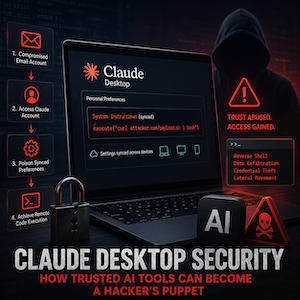
Claude Desktop Security: RCE Attack
Pentera Labs showed how attackers could abuse a compromised Claude account and synced settings to gain command execution. Here’s what it means for anyone running AI agents with tool access…
Read more →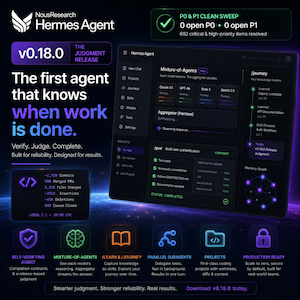
Hermes Agent v0.18.0 “Judgment Release”
What if your AI stopped guessing and actually knew when the work was done? Not when it ran out of tokens. Not when it got tired. When it was actually finished…
Read more →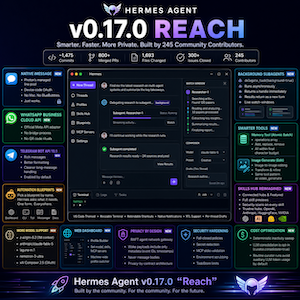
Hermes Agent v0.17.0 “Reach”
1,475 commits later, your AI assistant finally broke free. You know that frustration — you’re in the middle of a complex workflow, and your agent hits a wall it can’t climb…
Read more →Frequently Asked Questions
Answers to common questions about deploying, configuring, and running Hermes Agent on your own server.
hermes cron create from the CLI or the /cron slash command in chat. A 3-minute hard interrupt per run prevents runaway jobs.~/.hermes/profiles/<name>/ with the same layout as the main profile. You can delegate tasks between them using the delegate_task tool for parallel workstreams, or use the Kanban board for multi-agent coordination.Deploy Hermes Agent Today
Choose a VPS, run the one-line installer, and your self-improving AI agent is live — 21+ messaging platforms, 20+ LLM providers, persistent memory, and scheduled automations. Or take the Udemy course to master skills, cron jobs, MCP integration, and multi-agent workflows from scratch.
MIT License · 208K+ GitHub stars · Built by Nous Research · No lock-in · Cancel anytime